Local
AI
Run the Infinite Agent on a model that lives on your own Mac. Infinite Agent Manager picks the right model for your hardware, installs it and connects it to Infinite Trading in a few clicks. Then it lets you see and manage every local model you run.

Download
Get Infinite Agent Manager.
Free, about 6 MB, no account. Built in public by GitHub Actions from the commit shown below.
Infinite Agent Manager for macOS
Version 0.6.1 · macOS 13 or later (Ollama needs 14+)
SHA-256 2d474128bf0b7f4b…5fae195eSHA-256 2b0b0e3f232c76df…f1220c03SHA-256 c12e8ea266bfc4bc…f1d9d844All three contain the same app; the single-architecture files hold only your Mac's half of it. The app isn't notarized by Apple yet: the first time, right-click it and choose Open. You can also skip our download entirely and build it yourself.
Changelog
What's new.
Recent releases of Infinite Agent Manager.
Why we built it
Your agent, your hardware.
The Infinite Agent can run on Claude, OpenAI or a model on your own computer. The local option is private and free, but setting it up was the hard part. This app removes that step.
Private by default
Your questions about your portfolio and strategy go to a model on your own Mac, not to a cloud AI company.
No API bill
Local models are free to run. Use the Infinite Agent and the Market Scanner as much as you like.
Works offline
Once a model is downloaded, it answers without an internet connection to any AI provider.
No terminal
Local AI used to mean installers, commands and environment variables. Now it's a few clicks.
What it is
A setup wizard and an agent manager.
Three tabs: one to choose and install models, two to keep an eye on everything that runs.
Library
Every model with what it's good at, its size and how well it fits your Mac, plus one-click setup for the recommended one.
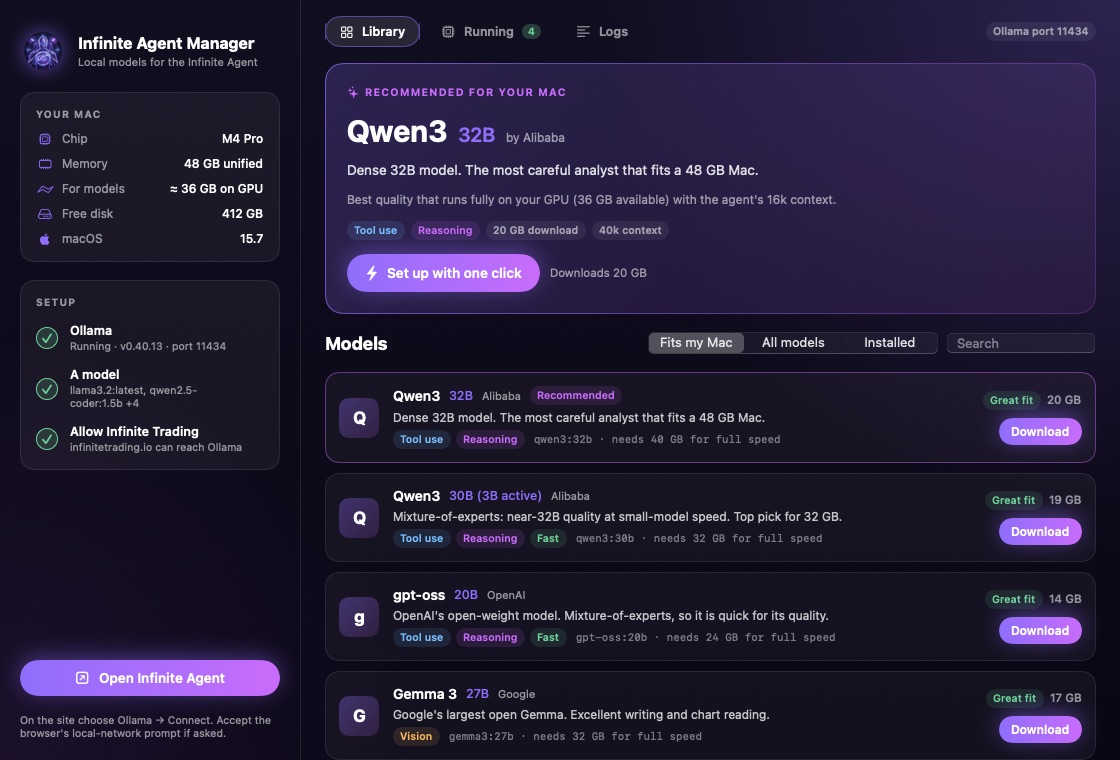
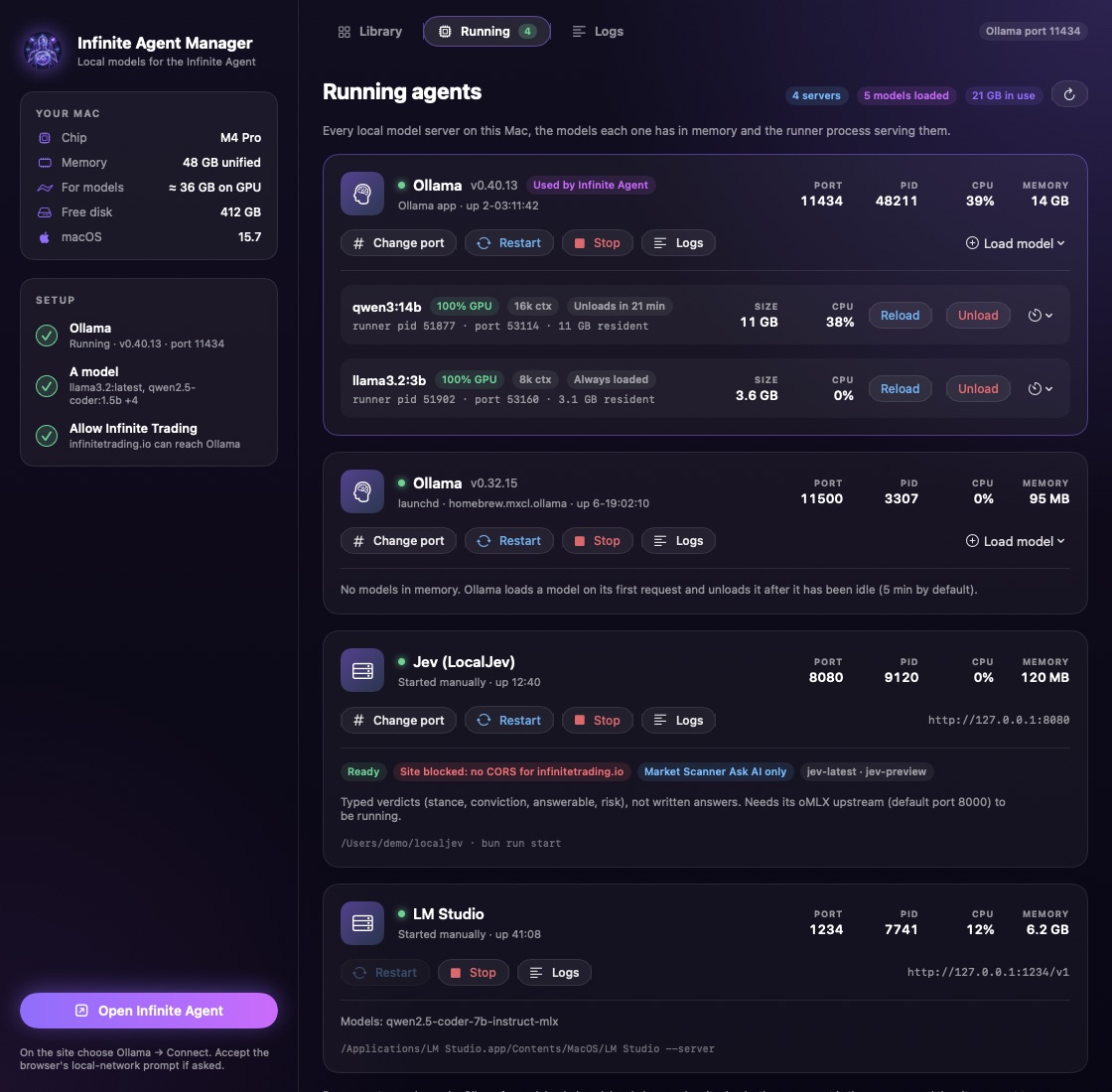
Running
Every local model server on your Mac (Ollama, LM Studio, llama.cpp, MLX, vLLM…) with its port, PID, CPU and memory. Restart, stop or move it to another port. See each loaded model and its runner process; reload, unload or keep it loaded.
Logs
Live server logs with filters for problems, plus a log of every action the app takes, so nothing happens silently.
Screenshots use sample servers and a simulated 48 GB M4 Pro.
How it works
Six steps, one click.
“Set up with one click” on the recommended model runs all of them in order. Each step is also a button you can run on its own.
- 1
Reads your Mac
Chip, unified memory, free disk and macOS version. Nothing leaves your computer.
- 2
Recommends a model
The best of 19 open models that runs fully on your GPU with the agent's 16k context, from Llama 3.2 3B on 8 GB to gpt-oss 120B on 128 GB.
- 3
Installs Ollama, verified
Downloads the official Ollama app and installs it only if Apple's notarization and Ollama's own Developer ID signature both check out.
- 4
Downloads the model
With live progress. Pause any time; it resumes where it stopped.
- 5
Allows infinitetrading.io
Adds this site to Ollama's allowed origins (OLLAMA_ORIGINS), restarts it, and checks the connection exactly as your browser will.
- 6
Opens the Infinite Agent
Choose Ollama → Connect. The agent picks up your new model.
What it changes on your Mac
OLLAMA_ORIGINS(andOLLAMA_HOSTif you change the port), set withlaunchctland kept by one LaunchAgent,io.infinitetrading.agentmanager.ollama-env.- The official
Ollama.appin Applications, only when you ask it to install Ollama. - An activity log of every action, in
~/Library/Logs/Infinite Agent Manager.
No telemetry and no account. The app talks only to ollama.com (Ollama and model downloads) and to servers on your own Mac. Stop Allowing Infinite Trading removes exactly what it added.
Open source
Don't trust. Verify.
An app that installs software and changes settings on your Mac should be inspectable. Every line is on GitHub under the MIT license, and every release can be checked against it.
The file is the one we published
Its SHA-256 must match the release and the hash at the top of this page.
shasum -a 256 ~/Downloads/InfiniteAgentManager-0.6.1*.dmgGitHub built it from that commit
A signed build-provenance attestation (Sigstore) ties the DMG to the exact commit and workflow run.
gh attestation verify ~/Downloads/InfiniteAgentManager-0.6.1.dmg --repo InfiniteTradingProtocol/infinite-trading-local-aiThe app inside is exactly the source
Rebuild from the tag and compare byte for byte. Only the signature and the linker's random UUID are set aside.
git checkout v0.6.1 && bash scripts/verify.sh ~/Downloads/InfiniteAgentManager-0.6.1.dmgBuild it yourself
You don't need our download.
No third-party dependencies, just Apple's Swift compiler. Three commands give you the same app.
git clone https://github.com/InfiniteTradingProtocol/infinite-trading-local-ai
cd infinite-trading-local-ai
bash mac/build.sh
open "build/Infinite Agent Manager.app"
Needs macOS 13+ and Xcode or the Command Line Tools (xcode-select --install). The README walks through each source file and every change the app makes to your Mac.
Windows and Linux are next.
Same catalog and the same verify-don't-trust builds. Until then, Ollama works on both; set it up from the Infinite Agent's connect dialog.
Infinite Agent is analysis software, not financial advice. Local models can be wrong, like any AI. Ollama and the models are third-party software under their own licenses.